This is my Portable Lab
Ive been going to school for Internetworking for a few years now.
While I have learned alot, ive always gotten stuck on Active Directory.
It is very complex and I learn best when I can mess around hands on, so I decided to build my own.
This only covers the hardware side of my setup. It was too much to put in one page, so if you would like to see the active directory side go here..
Now i had some constraints.
- I need to be able to work on it from anywhere.
- I want it to have internet.
- It needs to run at least 4 virtual machines
I have a proxmox server at home with plenty of processing power. The problem with that is my school blocks external connections. Without setting up a proxy that can bypass the schools network, i cant use that. I could use linode, aws, or azure server but im broke. I ended up just using my school laptop to startout.
My school laptop has a core ultra 7 and 16 gb of ram. Pretty good but i cant run anything more than 2-3 vms without closing every other app running on the PC. Despite this i downloaded a copy of Windows 11 Pro, Windows Server 2025, and a copy of PFSense.
Attempt 1: The first build
One machine, just my school laptop. Pretty simple, 3 VM's, 1 Private Switch, and 1 Default Switch.
I started with pfsense for creating a central router. I connected my external default switch to the pfsense wan and the private switch to the lan of the pfsense. If your wondering i used 10.0.0.0/24 for the internal network.
After that i created the windows server and windows 11 pro vms. This was pretty straightforward. Grab the iso, create the vms and install.
I created the first windows server vm and named it DC01 which will be the vm that will run the whole network.
Then i created the windows client which i named CLIENT01. With the vms made i setup active directory on DC01 and enabled dhcp. WIth that enabled I was able to ping CLIENT01 from DC01.
At this point is when i have to cut back on the dedicated ram and fenagle my system to use it.
I need to be able to do research while working so with my options are use my phone or close and reopen the web browser anytime i changed a vm, i needed another solution.
Upgrade the ram i though, after a few minutes i realized that aquiring ddr5 sodimm ram is not cheap right now, and again im broke.
Attempt 2: Split the load
Now i have a crazy idea. I thought, why not just use a second laptop. I have a second laptop that is a beast.
I dont use it because its clunky and i enjoy the touchscreen of my school laptop.
The beast in question is the Dell Precision 7540; an 8 core, 16 thread workstation laptop with a built in RTX Quadro 3000.
It also only has 16 GB of ram, but i figured it would be enough to run atleast 3 vms.
Now my plan is to connect two laptops directly with an ethernet cable. Then use the hyperv connect a server feature so that i could control the vms from my school computer.
I grabbed the equipment, setup the networks, and configured the firewall to allow traffic between the computers. I learned about Cred SSP authentication and setup my school laptop to pass credetials to the workstation laptop.
Once i got the hardware setup and configured, i was able to connect to cwserver.local from cschool.local.
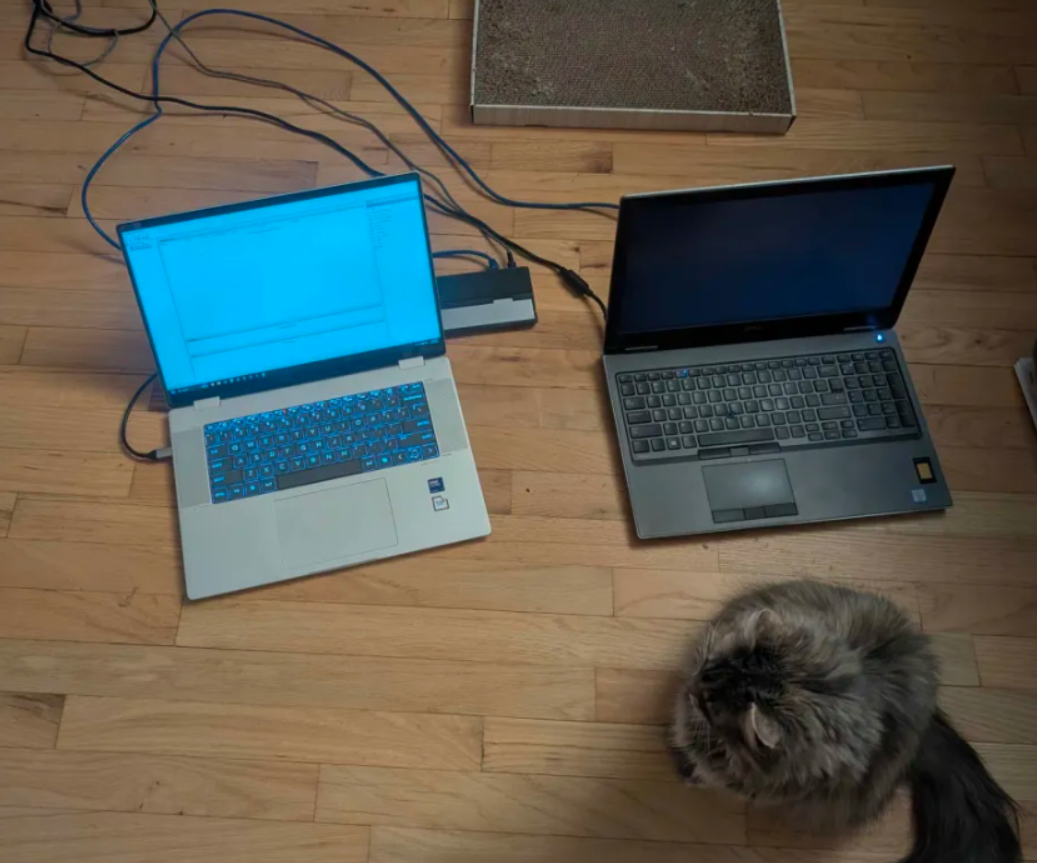
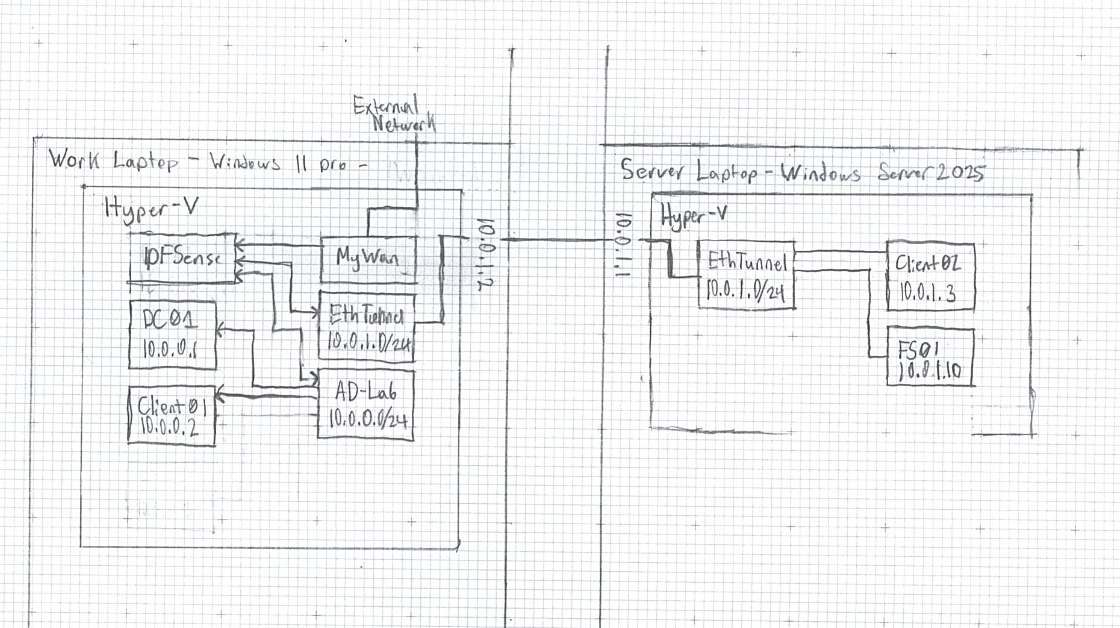
The next step was internetworking the vms and the physical adapter. Before, i was able to use an external network passed to my pfsense which handels the internal private network switch of hyperv.
That wouldnt work now that i have two seperate networks 10.0.1.0/31 for connecting the computers and 10.0.0.0/24 for managing the internal network of the vms. My solution im not proud of, but it works for now and will be fixed in the future.
I expanded the physical external network connecting the two machines to 10.0.1.0/24 and setup pfsense to pass the traffic between the 10.0.1.0 and 10.0.0.0 networks.
Then setup dns and dhcp on pfsense to redirect querys to the windows server vm at 10.0.0.10.
For the vms i duplicated the server and client over to the workstation laptop. I created a generic CLIENT02 vm and an FS01 to get started with file sharing.
I got them connected to the domain and the dns just worked. I was able to ping DC01 from FS01 which was 10.0.0.10 from 10.0.1.10.
Now at this point ive got a solid setup. PFSense properly routes the traffic, I have 2 servers and 2 clients, and ive setup groups and users for a fake company.
I really just need to work on the actual AD side to learn more about how to use it.
Bigger and Better
DDR5 ram was too expensive, but thats exatly why i bought this workstation laptop. It is EXTREMLY upgradeable. I ordered 2x8 sodimm sticks and am going to upgrade the workstation to run all the vms.
Hopefully, 32 GB of ram should be enough for at least 6 vms on that one machine.
Im putting this here as a marker, im not finished with this project im working on it in real time. I will update the site when i get new things to talk about